Tools · Model Watch
Premiere lets editors judge a generated shot inside the cut
Adobe’s Generative Media tool brings video and sound creation into the timeline, where the result has to fit.
Reporting updated Sep 23, 2026
THE TAKEAWAY
A shot can look good alone and still break the scene. Generate it where you can watch both joins.
What Happened
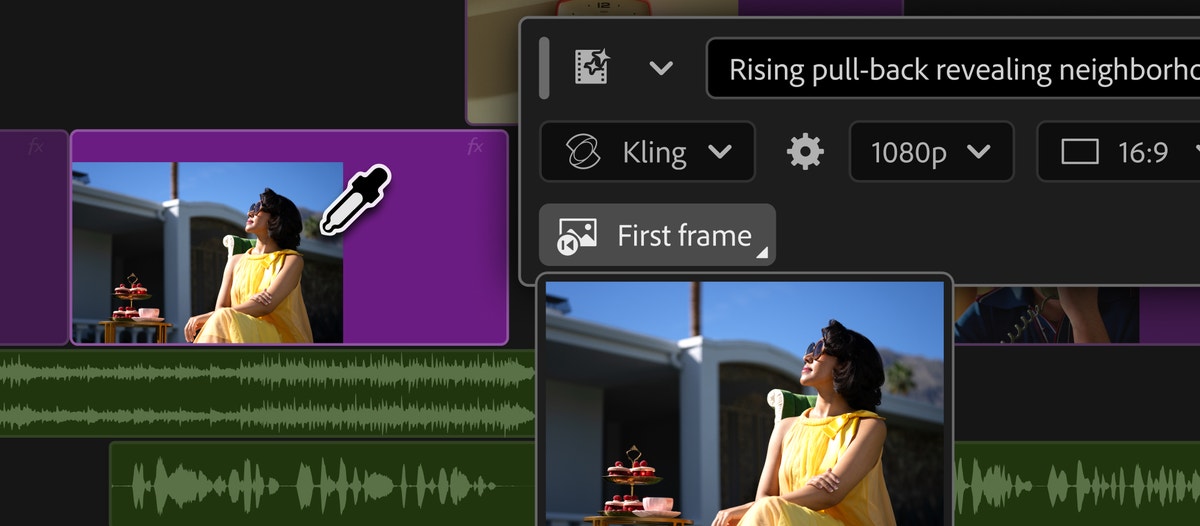
Adobe’s September 8 update introduced a Generative Media tool in Premiere. Editors choose a place in the timeline, describe what they need and generate a clip without leaving the project.
Adobe says video generation can use reference frames from the surrounding edit. Model choices include Firefly and partners such as Google Veo, Kling, Runway and Luma. The company also describes sound-effects generation and beta tools for soundscapes and music.
Why It Matters
A small team can try an insert while the timing and neighboring shots are still in front of it. That removes the export-and-import trip from the experiment. It does not settle whether the new shot belongs in the scene; the editor still has to watch the cut.
Test the Joins
Pick a short gap between two existing shots. Generate a candidate, then play through from the previous shot to the next one. Check whether the motion, lighting and pace carry across both cuts.
If it fails, name the problem before generating again. A camera move that feels wrong needs a different correction from a shot that simply lasts too long. Keep a useful temporary insert clearly marked until it earns its place in the final edit.
Watch the Beta Labels
Adobe labels Soundscape and Music as beta features. Check availability in your installed version before relying on them for a deadline.